Web Design: Efficient Workflow
Four steps of efficient web design workflow: 1.Sketch form with brainstorming. 2.Moodboard. 3.Design. 4.Revision.
Sketch
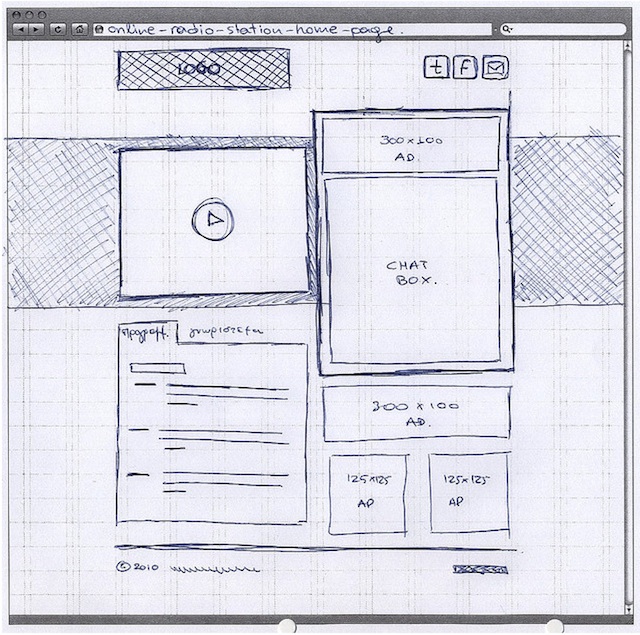
1.Use pen/pencil graph paper. 2.Think about UX and wire framing (think about the content and audience). 3.A good UX includes element of enjoyment. 4.Explore layout ideas. 5.Sketching is in order to reduce redundancies and streamline the design in process. 6.You can also use Photoshop, Illustrator and other software to create web graphics.
Moodboard

A mood board is a type of collage consisting of images, text, and samples of objects in a composition. It can be based upon a set topic or can be any material chosen at random. A mood board can be used to give a general idea of a topic, or to show how different something is from the modern day.
Use Photoshop to make the layout. It is a time saver. It gives designers more opportunities. Enhance and streamline your design workflow.
Web design mock-up
It has four distinct steps: 1.The digital sketch. 2.Adding mood board elements. 3.Inserting content. 4.Fine-tuning the layout.
Inserting the content
Adjust the content: font face/size/style/color/case/leading. Adjust the picture: crop/scale/align/distribute/add effects. Test alternatives: color/background color/pattern/size/scale/measure.
Revision process
This is when you take your design, make the client change requests, and adjust the layout. Be thoughtful and adjust wisely.

 LITTLEREN